VR Inflight Safety Procedure
A Unity VR trainer where cabin safety procedures are completed by hand in an aircraft interior, with each step validated before the next unlocks.
- Engagement
- Client Project
- Type
- VR Training Application
- Role
- VR Developer
Demo
Archived
Code
View Source
Tech Stack


The Brief
Cabin safety training is mostly watched, not done. Trainees see a demonstration, answer questions about it, and are assumed to have absorbed a physical procedure they have never physically performed. The failure mode is specific: people can describe how a life vest works and still fumble the buckles.
The client wanted the physical half of that training to actually happen, without an aircraft mock-up. That framed the whole project as a validation problem rather than a graphics one. Putting a trainee in a cabin is easy. Knowing whether they genuinely completed a procedure, in order, without letting them skip to the end, is the part that takes work.
106
Question bank
One ScriptableObject per question, so the bank is edited in the Unity inspector rather than in code. 10 are sampled per attempt.
5
Validated procedures
Life vest, oxygen mask, sickness bag, seatbelt, and emergency exit, each gated on its own completion checks.
3
Learning modes
A guided demonstration to watch, a free practicum to perform, and an assessment to answer.
How It Works
The application runs in three modes that build on each other.
Demonstration plays a procedure through so the trainee can watch it performed correctly before attempting it. Practicum hands control over and requires them to do it. Assessment is the written half, sampling 10 questions from a bank of 106 so that repeated attempts rarely see the same set.
The practicum covers five procedures, and each one is gated on its own completion conditions rather than a generic "next" button:
Life vest
- Pick the vest up and bring it to the body
- Fasten each buckle connector
Oxygen mask
- Grab the mask and bring it to the face anchor
Air sickness bag
- Grab the bag with both hands, using dual attach points
- Bring it to the mouth position
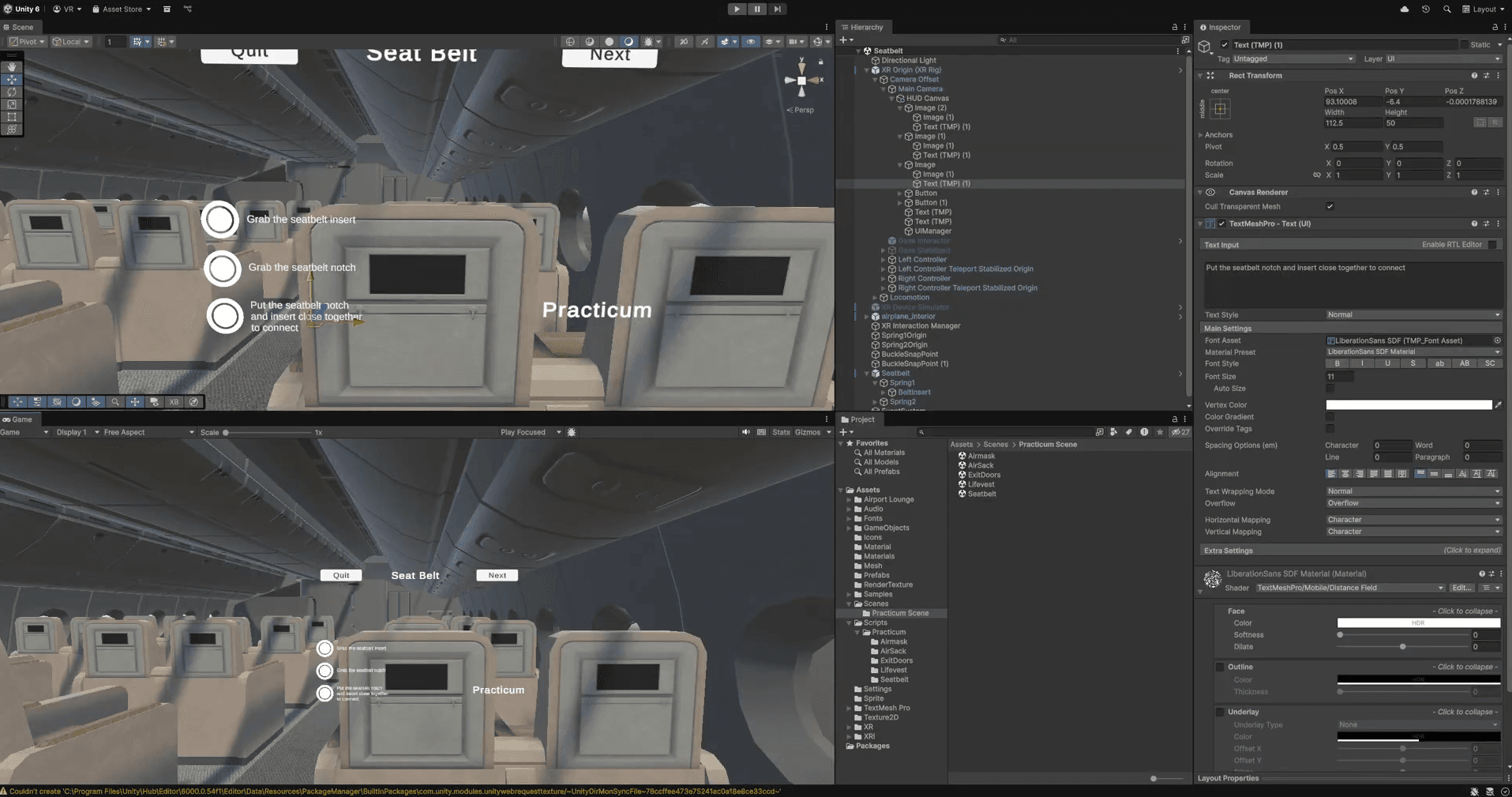
Seatbelt
- Locate both belt ends
- Connect them at the buckle
Emergency exit
- Follow the directional indicators to the correct door
Questions are ScriptableObjects, one asset per question. That was a deliberate choice so the client could extend the bank from the Unity inspector without a rebuild, and it is the reason the bank grew to 106 without a single code change.
Key Decisions
Physical completion instead of confirmation prompts
A procedure is complete when the objects are where they should be, not when the trainee presses a button saying they are. The vest attaches when it collides with the body anchor, and the buckles are separate connectors that each report their own connected state.
The cost: this is far harder to get right than a prompt, and it fails in ways a prompt never would. A trainee holding an object at a plausible-looking angle that never triggers the collider gets stuck with no idea why. Most of the tuning work on this project went into making the attach volumes forgiving enough to feel fair without being so loose that waving the vest near your chest counts as wearing it.
Reparenting grab interactables before disabling them
This was the bug that took longest to understand, and it is specific enough to be worth writing down.
The life vest is grabbable. Its buckle connectors are child objects that are also grabbable. When the vest snaps to the body, the vest itself should stop being grabbable, but the buckles must become grabbable, because fastening them is the next step.
Disabling the parent's XRGrabInteractable cascades into the children and silently kills the buckles. The fix is ordering: move the connectors out to world space and re-enable them first, disable the parent second, then reattach the connectors for a clean hierarchy.
// Reparent seatbelt connectors BEFORE disabling parent grab.
// This prevents the parent's disabled state from affecting children.
foreach (var connector in seatbeltConnectors)
{
    connector.transform.SetParent(null, true);
    connector.ForceResetGrabState();

    var connectorGrab = connector.GetComponent<XRGrabInteractable>();
    if (connectorGrab != null)
        connectorGrab.enabled = true;
}

transform.SetParent(bodyAnchor, true);

// Disable parent grab AFTER handling children
grabInteractable.enabled = false;
The connectors are discovered with GetComponentsInChildren rather than wired up in the inspector, so a vest prefab with a different number of buckles works without a code change.
Procedures as isolated scenes
Each of the five procedures is its own scene reached from the practicum menu, rather than sections of one continuous flow.
The cost: state does not carry across them, so there is no single session record of a trainee's full run, and shared cabin geometry is loaded per scene instead of once. The upside is worth it for training: a trainee who fumbles the seatbelt retries the seatbelt, and an instructor can send someone straight to the procedure they are weak on.
Sampling the question bank without replacement
Each attempt draws 10 questions from 106 by copying the list and removing as it picks, so a single attempt never repeats a question.
List<QuestionData> GetRandomQuestions(List<QuestionData> source, int count)
{
    List<QuestionData> copy = new List<QuestionData>(source);
    List<QuestionData> result = new List<QuestionData>();

    for (int i = 0; i < count; i++)
    {
        int rand = Random.Range(0, copy.Count);
        result.Add(copy[rand]);
        copy.RemoveAt(rand);
    }

    return result;
}
The cost: it will throw if count ever exceeds the bank size, which is fine at 10 of 106 and would not be if someone raised the sample size without checking. It also weights nothing, so a trainee can draw 10 questions that all avoid the topic they are weakest on.
What I'd Do Differently
The system knows whether a procedure was completed, and nothing else. It does not record how long a trainee took, how many attempts a buckle needed, or where they were looking when they got stuck. For a training tool that is the most valuable data in the building, and all of it was passing through the code already. An instructor cannot currently answer "which step does everyone struggle with", which is the question a trainer actually has.
I would also unify the interaction validation. Each procedure grew its own attacher and UI manager, and while they follow the same shape, they do not share one. Adding a sixth procedure means writing that shape again rather than configuring it, and the tuning lessons learned on the life vest had to be re-applied by hand to the mask and the sickness bag.